Best AI Tools for Data Analysis in 2026: 10 Tools Tested & Ranked
Every AI analytics vendor claims to be the best. Most rank themselves first on their own blog. We picked ten tools, gave them the same dataset and same question, and ranked them by output quality — not marketing copy.
- #1 PlotStudio AI — best overall for defensible analysis on CSV/Excel. Desktop-local, reproducible, analyst-grade output.
- #2 Julius AI — fast chatbot for quick questions, but no cleaning, comparison groups, or caveats.
- #3 ChatGPT Advanced Data Analysis — shallow but useful for throwaway exploration.
- #4 Claude — best long-context chatbot for large workbooks.
- #5–10 — Copilot, Hex, camelAI, Tableau, Power BI, ThoughtSpot, each best in a specific niche.
How We Ranked Them
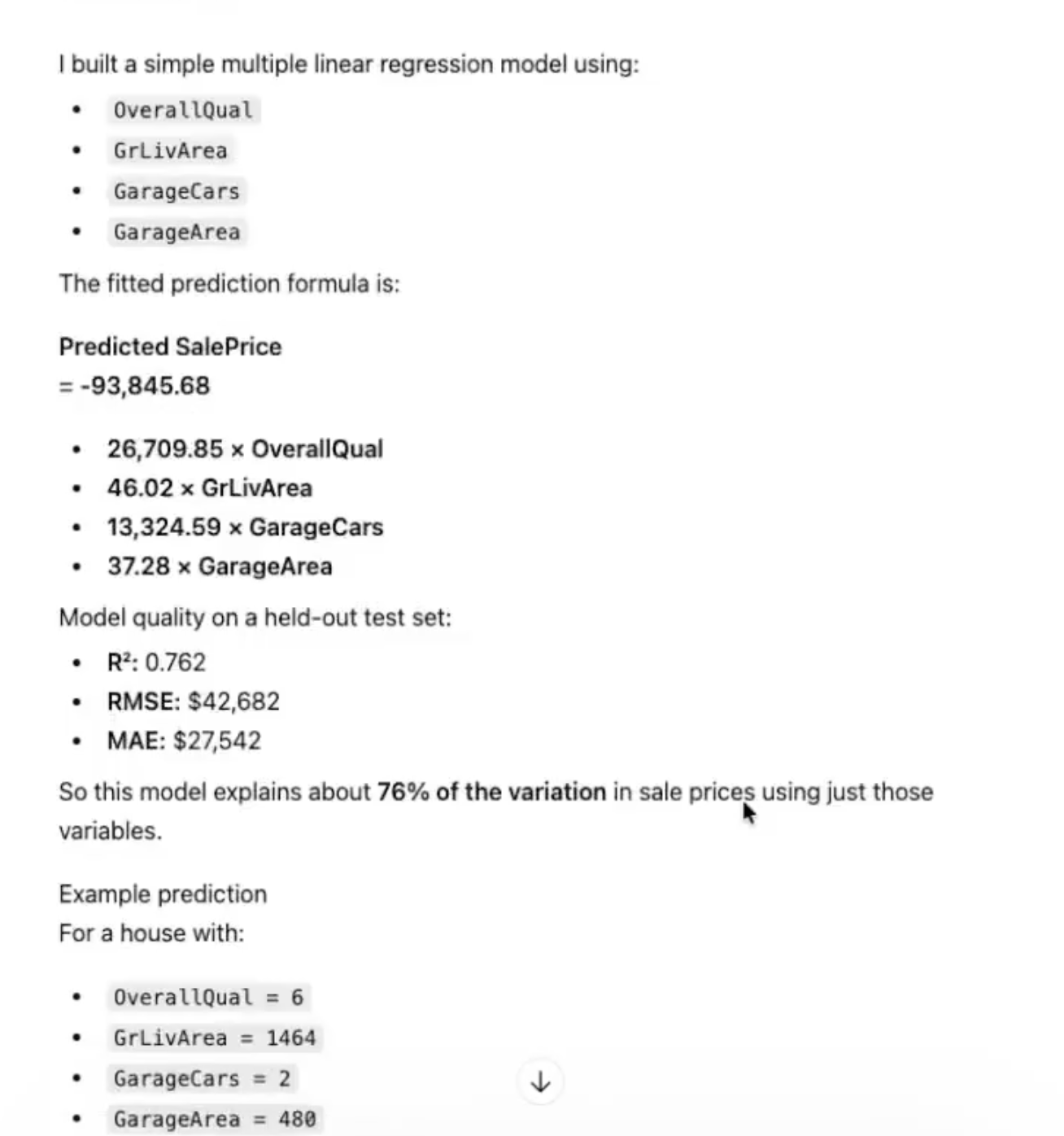
Rankings based on how each tool answers a real analyst question — not a benchmark. We gave each a Kaggle Ames Housing dataset (1,460 rows, 81 columns) and asked: "Build a model that predicts sale price, and tell me what drives it."
Scoring was based on six criteria:
- Profiles the data before asking — data quality score, missingness classification, distributions.
- Documents cleaning decisions — row counts, imputation rules, dropped rows.
- Comparison groups and proportional statistics — not just raw counts.
- Appropriate feature engineering — interaction terms, polynomial features, domain-aware transformations.
- Limitations and caveats — sample size, assumptions, where the model breaks.
- Reproducibility — can someone re-run the analysis tomorrow and get the same answer?
A tool that skips any of these six steps is a fast calculator, not an analyst. Rank by that bar, and the list reshuffles dramatically from the marketing-ranked versions you'll see elsewhere.
Quick Comparison Table
| # | Tool | Best For | Free? | Local/Private? |
|---|---|---|---|---|
| 1 | PlotStudio AI | Defensible, auditable analysis on CSV/Excel — our pick | ✅ | ✅ |
| 2 | Julius AI | Fast exploratory Q&A on uploaded CSVs | ✅ | ❌ |
| 3 | ChatGPT (Advanced Data Analysis) | Single-question exploratory analysis | — | ❌ |
| 4 | Claude (Anthropic) | Long-context work, large workbooks | — | ❌ |
| 5 | Microsoft Copilot (Excel / Power BI) | Microsoft 365 shops | — | ❌ |
| 6 | Hex | Data teams that want AI-assisted notebooks | ✅ | ❌ |
| 7 | camelAI | Live-database conversational analytics | ✅ | ❌ |
| 8 | Tableau (with Tableau Pulse / Einstein Copilot) | Enterprise governed dashboards | — | ❌ |
| 9 | Power BI (with Copilot) | Microsoft shops that want free BI + AI | ✅ | ❌ |
| 10 | ThoughtSpot | Search-driven enterprise analytics | — | ❌ |
The 10 Tools
1. PlotStudio AI
Defensible, auditable analysis on CSV/Excel — our pick
- Profiles data before you ask anything
- Documents every cleaning decision with row counts
- Runs comparison groups + proportional statistics + caveats
- Exports Jupyter notebook for reproducibility
- Runs locally — data never leaves your machine
- CSV/Excel today, live DB connectors on roadmap
- Desktop only, no web version
Verdict: If you want one tool that can go from "quick chart" to "defensible report" on the same question, this is it.
Try #1 yourself
Desktop app, free trial, runs locally. Upload a CSV and see the analyst workflow.
Download PlotStudio AI2. Julius AI
Fast exploratory Q&A on uploaded CSVs
- Clean UX
- Fast answer turnaround
- Broad integrations
- No documented data cleaning
- Reports counts without comparison groups
- No sample-size caveats
- Cloud upload — not suitable for regulated data
Verdict: Good for throwaway questions. Falls apart when output has to travel.
3. ChatGPT (Advanced Data Analysis)
Single-question exploratory analysis
- Can run Python on a CSV
- Very fast for simple queries
- Huge knowledge base
- No structured profiling
- Skips feature engineering unless prompted
- No limitations section
- Sandbox — not reproducible tomorrow
- Data goes to OpenAI
Verdict: A fast calculator. Not a deliverable.
4. Claude (Anthropic)
Long-context work, large workbooks
- 1M-token context
- Strong reasoning for long prompts
- Projects feature for persistent file sets
- Same chatbot limits as ChatGPT: no structured workflow, no caveats
- Cloud-only
Verdict: Best chatbot for large files — but still a chatbot.
5. Microsoft Copilot (Excel / Power BI)
Microsoft 365 shops
- Native integration with Excel / Power BI
- Enterprise compliance story
- Zero friction if you already live in M365
- Summaries and formulas, not real analysis
- Limited without a well-modeled dataset
- Best-in-class only inside Microsoft stack
Verdict: Use it for summaries of dashboards you already have. Not for net-new analysis.
6. Hex
Data teams that want AI-assisted notebooks
- Notebook + dashboard hybrid
- SQL + Python first-class
- Strong warehouse integrations
- Steeper learning curve
- Overkill for a solo analyst
- Cloud-hosted
Verdict: Right pick for a team that can read code and wants AI as a co-pilot rather than a replacement.
7. camelAI
Live-database conversational analytics
- Direct connections to Postgres, Snowflake, BigQuery, MySQL, 40+ sources
- Team collaboration built in
- Cloud-hosted — not for regulated data
- Output is dashboard-style, not analyst-report-style
Verdict: Best fit if your data is in a warehouse and you never want to export CSVs again.
8. Tableau (with Tableau Pulse / Einstein Copilot)
Enterprise governed dashboards
- Most mature visual analytics on the market
- Huge ecosystem and training resources
- Strong governance
- Not a "upload CSV and ask" workflow — needs modeled data
- Expensive, steep learning curve
- AI features are bolted on
Verdict: The right tool if you actually need governed dashboards — not for ad-hoc analysis.
9. Power BI (with Copilot)
Microsoft shops that want free BI + AI
- Power BI Desktop is genuinely free and capable
- Copilot in Power BI answers questions in plain English
- Deep Microsoft stack integration
- Requires a well-modeled dataset
- AI value scales with your modeling investment
Verdict: If you're already Microsoft, the free Power BI Desktop is the right starting point before buying anything else.
10. ThoughtSpot
Search-driven enterprise analytics
- Google-like search over warehouse data
- Sage AI lets non-technical users ask questions
- Mature governance
- Warehouse-only, not ad-hoc CSV
- Enterprise-only pricing
Verdict: The enterprise version of "ask a question, get a chart" — scales to thousands of governed users.
How to Pick
- If the output must be defensible (client, board, compliance): PlotStudio AI.
- If your data is in a warehouse: camelAI or Hex.
- If your data is sensitive or regulated: PlotStudio AI (only local option).
- If you need enterprise dashboards: Tableau, Power BI, or ThoughtSpot.
- If you want a quick answer and nothing more: ChatGPT, Claude, or Julius.
- If you're already Microsoft: Power BI Desktop (free).
Verdict
The best AI tool for data analysis in 2026 is the one that does what an analyst would do — profile, clean, compare, caveat, document. Measured against that bar, most of the tools in this space are fast calculators, not analysts. PlotStudio AI is the one we built because that was the gap.
Try the #1 tool on this list
Free desktop trial. Runs locally. No credit card.